The Engineering Behind the Tool
We believe in transparency. When you are planning a build that involves vehicle safety and legal compliance, you shouldn't have to trust a "black box" that just spits out a number.
This page explains exactly how our 4WD GVM Calculator works, the physics equations we use, and the assumptions we make to generate your results.
1. The Starting Point: Factory Data
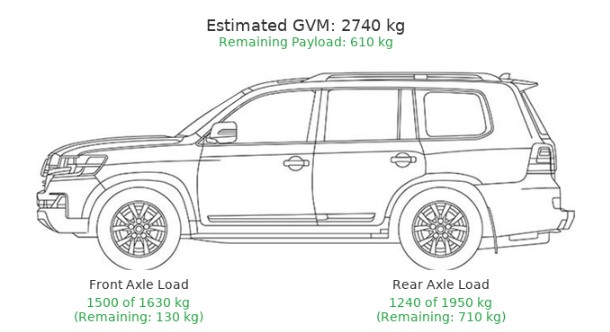
Every calculation starts with the vehicle's "Base State." We pull this data directly from manufacturer specifications.
- Tare Weight: The weight of the empty vehicle.
- OEM Axle Weights: How much of that empty weight sits on the front wheels vs. the rear wheels.
- Wheelbase: The precise distance between the front and rear axles (critical for the leverage math).
2. The Physics: "Moments" and Leverage
This is where our calculator differs from a simple spreadsheet sum. We don't just add weight; we calculate where that weight is placed.
The calculator uses the Principle of Moments to determine how a load distributes across your axles.
The Logic: We measure the distance of every accessory (bullbar, fridge, tow ball) from the Front Axle.
- Between the Axles: If you place weight between the wheels (e.g., a driver), the weight is shared between the front and rear axles.
- On the Axle: If you place weight directly on top of the rear axle, 100% of that weight goes to the rear axle.
- Behind the Axle (The Cantilever): If you place weight behind the rear axle (e.g., a tow ball or spare wheel), the calculator applies a leverage ratio.
The "See-Saw" Effect: Because of this leverage, adding weight to the rear overhang does two things:
- It adds more than the item's actual weight to the rear axle.
- It lifts weight off the front axle (reducing steering traction).
Example in the calculator: If you add a 300kg load to the tow ball (on a typical dual cab), the math might look like this:
- Rear Axle: +420kg
- Front Axle: -120kg (Lifted)
- Total GVM: +300kg
Our tool handles this math for every single item you select.
3. Accessory Data & Assumptions

Since we can't weigh your specific bullbar, we use as much company report weights for each brand and model.
All inputs can be adjusted by the user as they research their components to ensure the best inputs.
Fuel: Calculated at 0.83kg per litre (approximate density of diesel).
Passengers: We assume a standard adult weighs 85kg. You can adjust this in the "Occupants" section if your setup differs.
"The Driver" Factor: Many manufacturers calculate "Kerb Weight" with a full tank of fuel but no driver. Our calculator adds the driver by default (because 4WDs don't drive themselves!). This is why your baseline weight might look higher here than in the brochure - it’s more realistic.
4. GVM Upgrades

If you select a suspension upgrade from the dropdown list, the calculator replaces the factory limits with the Certified Limits provided by that suspension manufacturer.
Note: We assume the "Tare Weight" of the vehicle remains the same, but the Legal Limit (the red line in the diagram) moves up.
5. Disclaimer on Accuracy
While the calculator uses robust physics and accurate database values, it is a simulation.
- Manufacturing tolerances can vary the weight of your base vehicle by +/- 5%.
- Custom fabrication (trays, canopies) can vary wildly in weight.
- Mud, dust, and accumulated gear add up over time.
The Golden Rule: Use the calculator to plan your build, but always use a Certified Weighbridge to confirm your compliance.